CLAS multistream transmission facility IDs and an update to QZS L6 Tool
Introduction
The Quasi-Zenith Satellite System (QZSS), Michibiki, broadcasts augmentation signals to improve positioning accuracy in addition to positioning signals. Its positioning augmentation services in the L6 band include CLAS (Centimeter Level Augmentation Service) for users in Japan and MADOCA-PPP (Multi-GNSS ADvanced Orbit and Clock Augmentation - Precise Point Positioning), which can be used worldwide.
I develop and publish QZS L6 Tool (Quasi-Zenith Satellite L6-band Tool), a tool for displaying the contents of these augmentation messages.
Since September 1, 2025, CLAS has divided the satellites transmitting augmentation information into two groups, with each group transmitting different information. I revisited the interpretation of the Facility ID in this multistream transmission scheme and corrected the display in QZS L6 Tool.
CLAS multistream transmission
I summarized the changes from the fifth to the seventh edition of the IS-QZSS-L6 signal specification in CLAS multistream transmission pattern ID.
I later realized that both reserved bits had been 0 before multistream transmission began. Interpreting this value according to the seventh edition gives Pattern 1. Since I had misinterpreted these reserved bit values in the previous article, I reviewed the mapping between facility IDs and facility names.
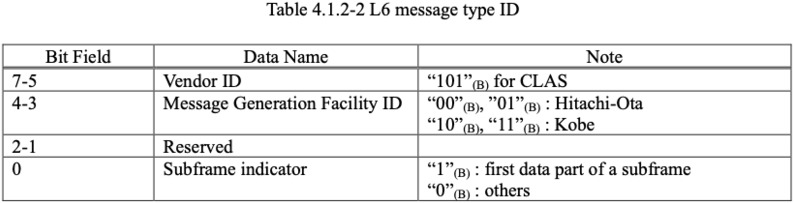
The definitions in the fifth and seventh editions, along with the corrected QZS L6 Tool display, are summarized below. The table covers bits 1 through 4 of the message type ID. The least significant bit, bit 0, indicates the start of a subframe and is not included in this table.
IS-QZSS-L6-005 (fifth edition)
IS-QZSS-L6-007 (seventh edition)
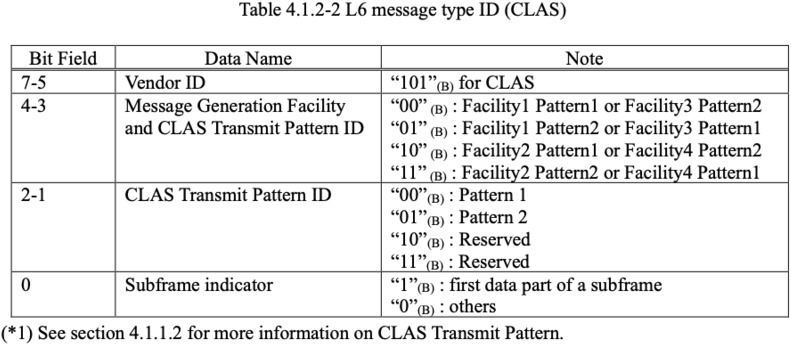
Mapping bits 1 through 4 of the message type ID to facility IDs and pattern IDs
The bits are listed from bit 1 to bit 4. In the seventh edition, bits 4–3 represent a combination of facility and transmit pattern, while bits 2–1 represent the transmit pattern. The facility names displayed by QZS L6 Tool are based on a mapping inferred by comparing the definitions in the fifth and seventh editions.
| Bit 1 | Bit 2 | Bit 3 | Bit 4 | IS-QZSS-L6-005 | IS-QZSS-L6-007 | QZS L6 Tool |
|---|---|---|---|---|---|---|
| 0 | 0 | 0 | 0 | Hitachi-Ota:0 | Facility 1 Pattern 1 | Hitachi-Ota:0 P1 |
| 0 | 0 | 0 | 1 | Kobe:0 | Facility 2 Pattern 1 | Kobe:0 P1 |
| 0 | 0 | 1 | 0 | Hitachi-Ota:1 | Facility 3 Pattern 1 | Hitachi-Ota:1 P1 |
| 0 | 0 | 1 | 1 | Kobe:1 | Facility 4 Pattern 1 | Kobe:1 P1 |
| 0 | 1 | 0 | 0 | Undefined | Reserved | Reserved |
| 0 | 1 | 0 | 1 | Undefined | Reserved | Reserved |
| 0 | 1 | 1 | 0 | Undefined | Reserved | Reserved |
| 0 | 1 | 1 | 1 | Undefined | Reserved | Reserved |
| 1 | 0 | 0 | 0 | Undefined | Facility 3 Pattern 2 | Hitachi-Ota:1 P2 |
| 1 | 0 | 0 | 1 | Undefined | Facility 4 Pattern 2 | Kobe:1 P2 |
| 1 | 0 | 1 | 0 | Undefined | Facility 1 Pattern 2 | Hitachi-Ota:0 P2 |
| 1 | 0 | 1 | 1 | Undefined | Facility 2 Pattern 2 | Kobe:0 P2 |
| 1 | 1 | 0 | 0 | Undefined | Reserved | Reserved |
| 1 | 1 | 0 | 1 | Undefined | Reserved | Reserved |
| 1 | 1 | 1 | 0 | Undefined | Reserved | Reserved |
| 1 | 1 | 1 | 1 | Undefined | Reserved | Reserved |
In the fifth-edition column, combinations in which the reserved bits are anything other than 00 are labeled “Undefined.” “Reserved” indicates that the pattern ID has a reserved value.
For example, when bits 1 through 4 of the message type ID are 0000, QZS L6 Tool displays Hitachi-Ota:0 P1. However, the seventh edition does not give control station names, so this comparison alone does not establish a definitive mapping between facility numbers and the actual control stations and data generation systems.
The nominal transmit patterns for each satellite listed in IS-QZSS-L6-007 are shown below. These are the assignments in the specification and do not indicate the current operational status of each satellite.
IS-QZSS-L6-007
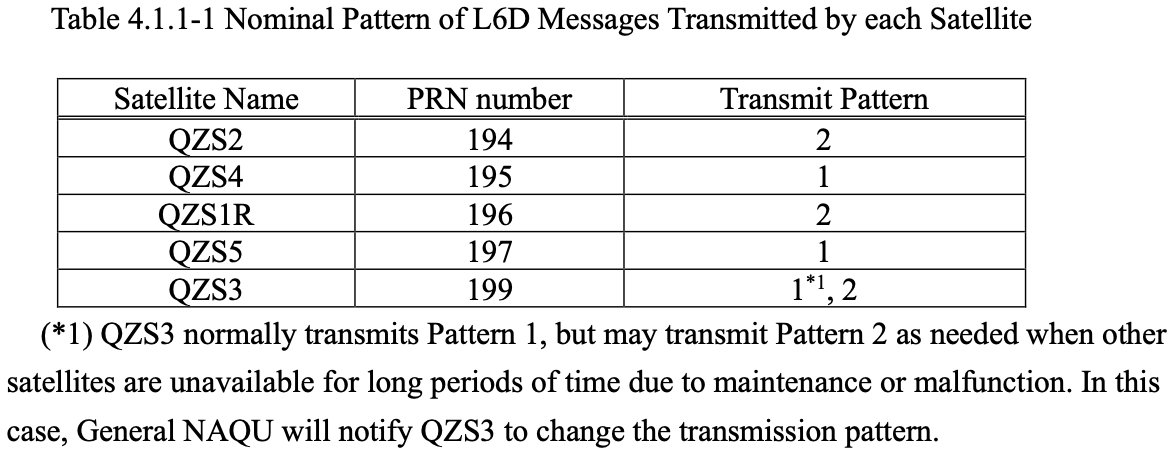
- Pattern 1: QZS-4 (PRN195), QZS-5 (PRN197), QZS-3 (PRN199)
- Pattern 2: QZS-2 (PRN194), QZS-1R (PRN196)
If reception is interrupted and the receiver switches to augmentation information from another satellite, the pattern ID needs attention. Data from a different pattern cannot simply be appended as a continuation of the same stream.
In the specification, Pattern 1 includes the geostationary satellite QZS-3. For receivers that cannot receive multiple CLAS signals simultaneously, one possible approach is to use only Pattern 1 and exclude PRN194 and PRN196 from reception. However, a note in the specification states that QZS-3 may transmit Pattern 2 in situations such as prolonged outages of other satellites. It is therefore necessary to check the pattern ID in the received data as well as the satellite’s PRN.
Using QZS L6 Tool
On macOS or Linux with Python and pip available, you can install QZS L6 Tool using the following command. See the QZS L6 Tool README for the required Python version and other requirements.
python3 -m pip install qzsl6tool
In a Windows environment, this example relies solely on the qzsl6read.py script; therefore, provided you have Python and pip available, you can similarly install the QZS L6 Tool and execute the following commands.
These changes are included in QZS L6 Tool version 0.1.8 and later. You can check the version with qzsl6read.py -h. If you installed an older version using pip, you can upgrade to the latest version as follows:
python3 -m pip install --upgrade qzsl6tool
By downloading data files from the official CLAS archive, you can analyze augmentation information without a receiver. For example, entering 2026-09-14 in both Start Epoch and End Epoch and clicking Search displays links to hourly archive files for that day, each 900 kilobytes in size.
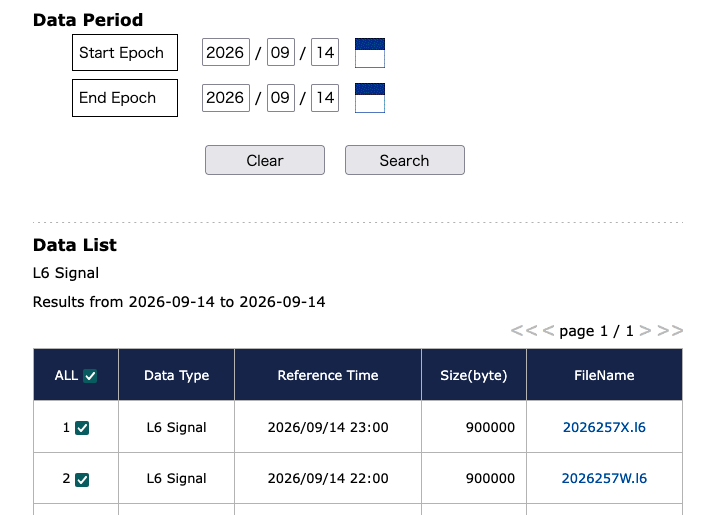
Clicking 2026257X.l6 downloads one hour of data starting at 23:00 on September 14, 2026. The time is shown in Coordinated Universal Time (UTC), so this corresponds to one hour starting at 08:00 on September 15 in Japan Standard Time (JST). You can also download the file directly with tools such as curl or wget by specifying the link URL.
Analyzing this file with qzsl6read.py from QZS L6 Tool lets you check the facility name, pattern ID, and PRN.
qzsl6read.py -c < 2026257X.l6 | head -10
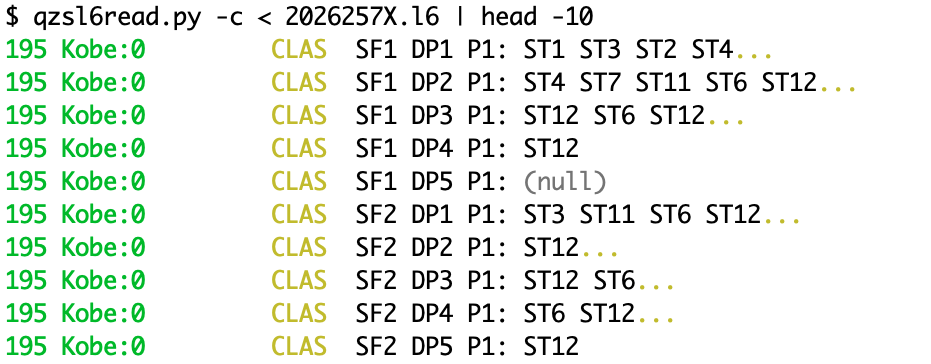
I downloaded and examined several L6 files. All the L6 data I checked in the official archive used Pattern 1 (P1). It would be nice to have L6 data for all PRNs, as is available for MADOCA-PPP.
The displayed control station name also differed between some files, showing either Kobe or Hitachi-Ota. Previously, the same augmentation information was generated regardless of which of the two control stations, or which of the two data generation systems at each station, was used.
I plan to use the detailed output option -t 1 to check whether the same augmentation information is still broadcast within a given pattern, regardless of the control station or data generation system. With this update, QZS L6 Tool treats the data as separate when the control station or data generation system changes.
L6 data also includes the PRN. In the future, I would like to add support for analyzing data from multiple PRNs simultaneously and examine how the transmitted data differs between satellites.
Related article(s):
- Using QZS L6 Tool from Docker 29th May 2026
- CLAS multistream transmission pattern ID 19th January 2026
- CLAS multi-stream test broadcast 1st July 2025
- Display of MADOCA-PPP ionospheric delay information using QZS L6 Tool 16th August 2024
- QZS L6 Tool output format change 14th April 2024
- Health information expression for QZSS 7-satellite configuration 12th April 2024
- Galileo Timing Service Message 6th April 2024
- L1S signal analysis with QZS L6 Tool 11st November 2023
- Galileo HAS live stream 25th July 2023
- HAS message display capability on QZS L6 Tool 5th March 2023
- Trial delivery of QZSS's MADOCA-PPP started 18th August 2022
- Capacity analysis of CLAS satellite augmentation information using QZSS archive data 9th June 2022
- QZSS CLAS tropospheric delay augmentation information for remote islands in Japan 17th May 2022
- Compact SSR display capability on QZS L6 Tool 29th March 2022
- Release of QZS L6 Tool, a positioning satellite message display tool 3rd February 2022